Fan clubs are a great way to earn additional income and setting one up is easy!
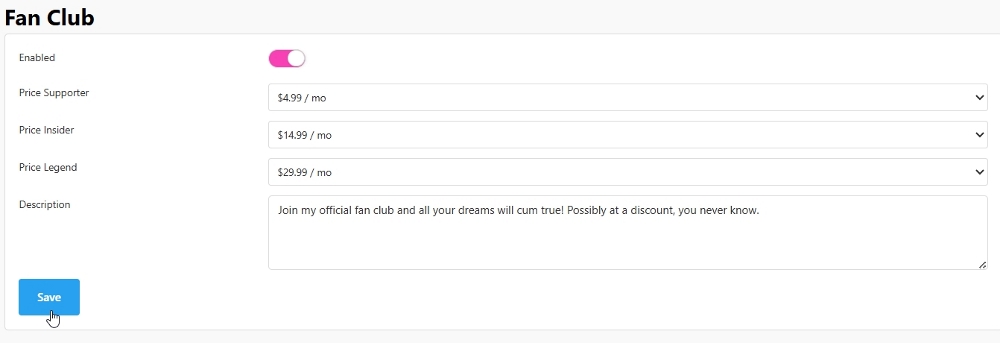
To activate your Fan Club:
- Navigate to your Settings & Privacy and slide the toggle to enable your fan club.
- Set your pricing, add a description, and tap the save button!
- Once your Fan Club is activated, users can access it on your model profile.
What kind of benefits do Fan Club subscribers receive?
There are three fan club tiers and benefits vary by level:
Supporter
- Special Supporter badge in the model's room
- Unlimited PM with the model
- 25% OFF Golden Ticket Shows
- Access to exclusive photos and videos
Insider
- Special Insider badge in the model's room
- Unlimited PM with the model
- FREE Spying on the model's Private Shows
- 50% OFF Golden Ticket Shows
- 10% OFF Control Her
- 10% OFF Exclusive Private Show
- 10% OFF Private Show
- 10% OFF Tip Menu
- 10% OFF Media
- Access to exclusive photos and videos
Legend
- Special Legend badge in the model's room
- Unlimited PM with the model
- FREE Spying on the model's Private Shows
- FREE Access to Golden Ticket Shows
- 25% OFF Control Her
- 25% OFF Exclusive Private Show
- 25% OFF Private Show
- 25% OFF Tip Menu
- 25% OFF Media
- Access to exclusive Photos and Videos
How do I know if someone is subscribed to my fanclub?
Fanclub subscribers will have a special badge representing their subscription level next to their username in your chatroom, your room guest list, and in your Message Center chats and/or friends list. Your notification history displays when a member joined your club, and you'll also be able to see subscription purchases listed on your Tokens & Earnings page.
What does "free access to Golden Ticket shows" really mean?
This means Legend-tier members do not need to purchase entry to your Golden Ticket show. These members will also have access to a recording of the show as long as they subscribe to your club. Please note these recordings can be muted if copyrighted audio or video is seen or heard during the stream.
How do I add existing media or exclusive media to my fan club?
For existing media:
- From the Media Management page, select a piece of media to edit.
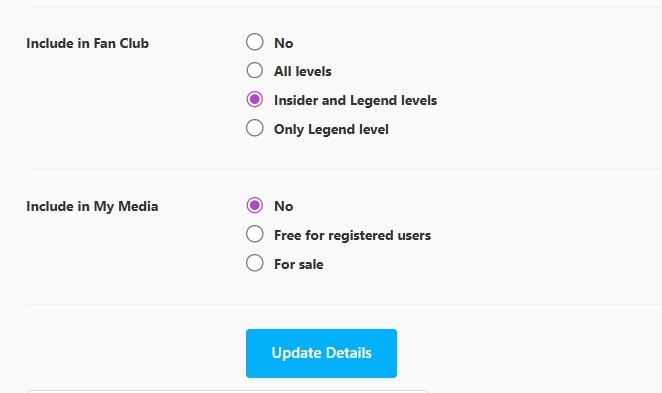
- Navigate to the availability settings, choose an option from the Include in Fan Club section, then tap Update Details.
To add exclusive media only available to certain fan club levels:
- Upload your media normally and add the relevant information.
- Select an option from the Include in Fan Club section (All Levels, Insider and Legend levels, or Only Legend Level).
- Select "No" in the Include in My Media section, then tap save. This will make the media exclusive to your fan club!
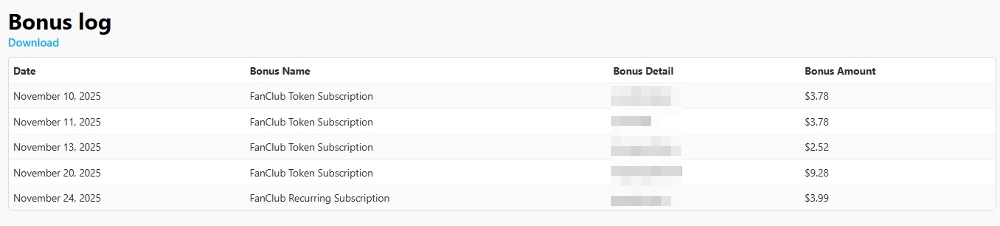
Where can I find information about my Fan Club earnings?
Navigate to your Tokens & Earnings page and scroll down to your Bonus Log. Here, you can view information about when a Fan Club membership was purchased, if it's recurring, who purchased it, and how much you earned from the sale.